
Best JavaScript frameworks for 2021

With any JavaScript development, you always want to make the process as comfortable, fast, and simple as possible while also improving product quality. For this purpose, there are frameworks that greatly simplify the process and save a lot of time.
However, when you just start working on a project, you will immediately run into the problem of choosing the framework. Which one is better? Which one suits my project the best? These are some tricky questions I will try to cover in this article.
How to choose the right framework?
For a better understanding of the topic, let’s highlight that depending on the conditions and your demands, the choice will differ so there is no definite answer to what is better. If this is the first time you faced such a problem, you will most likely try to find the most trustworthy framework. So here are several factors you should rely on.
- The reliability: can be assessed by the awareness and satisfaction of the community.
- The fact of the ease of study and comprehensibility: an important point during the first use.
- The framework’s benefits: you should pay attention to what this framework is “good at”.
- The well-documented guides: will help you to find solutions quickly.
Some statistics
Now when we know what to focus on let’s have a look at some other lists of top JavaScript frameworks. Based on Stack Overflow Developer Survey 2020, we can conclude that the most popular is jQuery, then React and Angular.
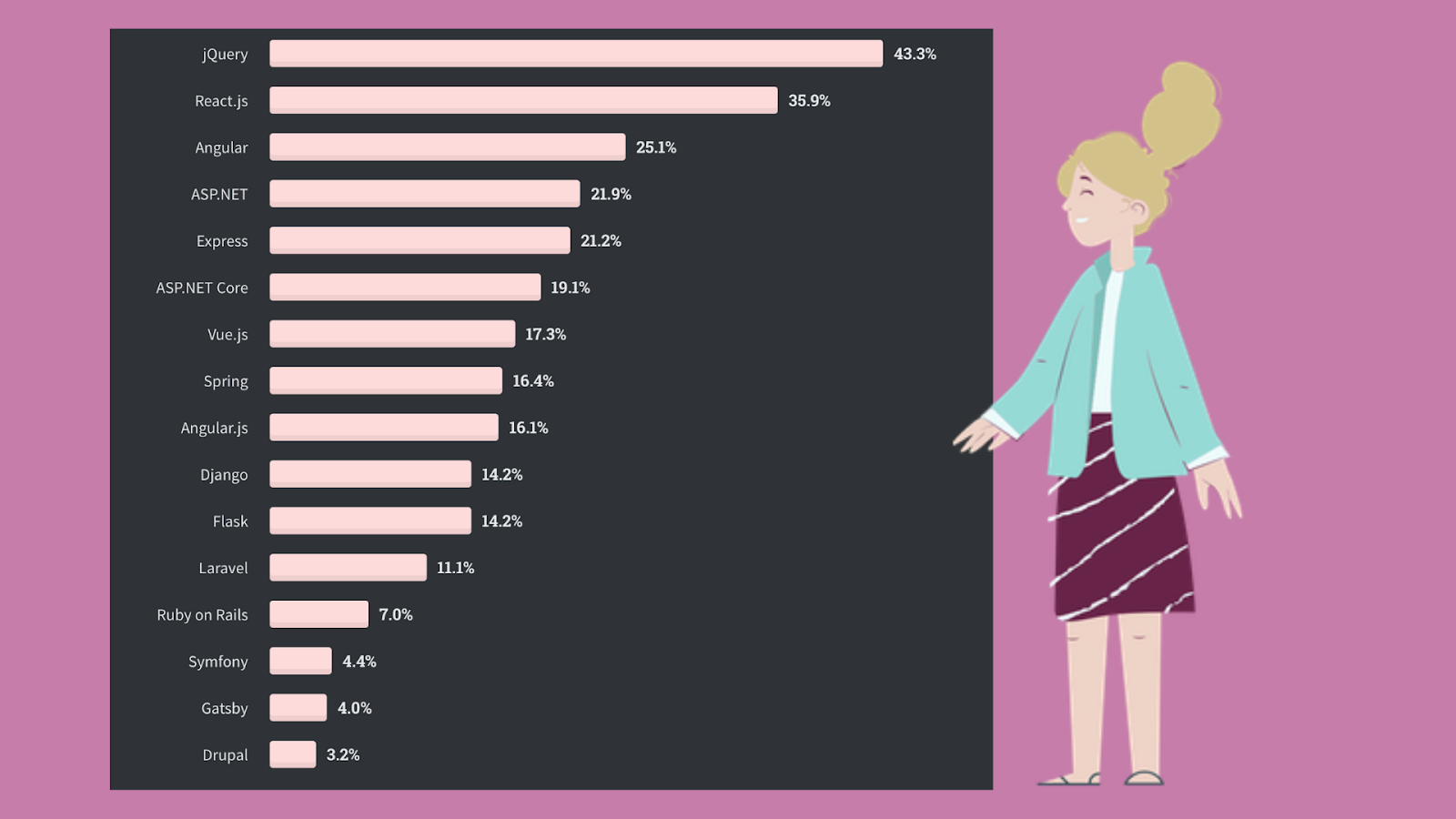
But they also mention that “… jQuery is still king but is slowly losing ground to React.js and Angular year over year. …” jQuery is so popular mainly since many old projects are written on it. Still, now more and more developers are switching to other options.
Accordingly, choosing the most famous framework does not guarantee its coolness.
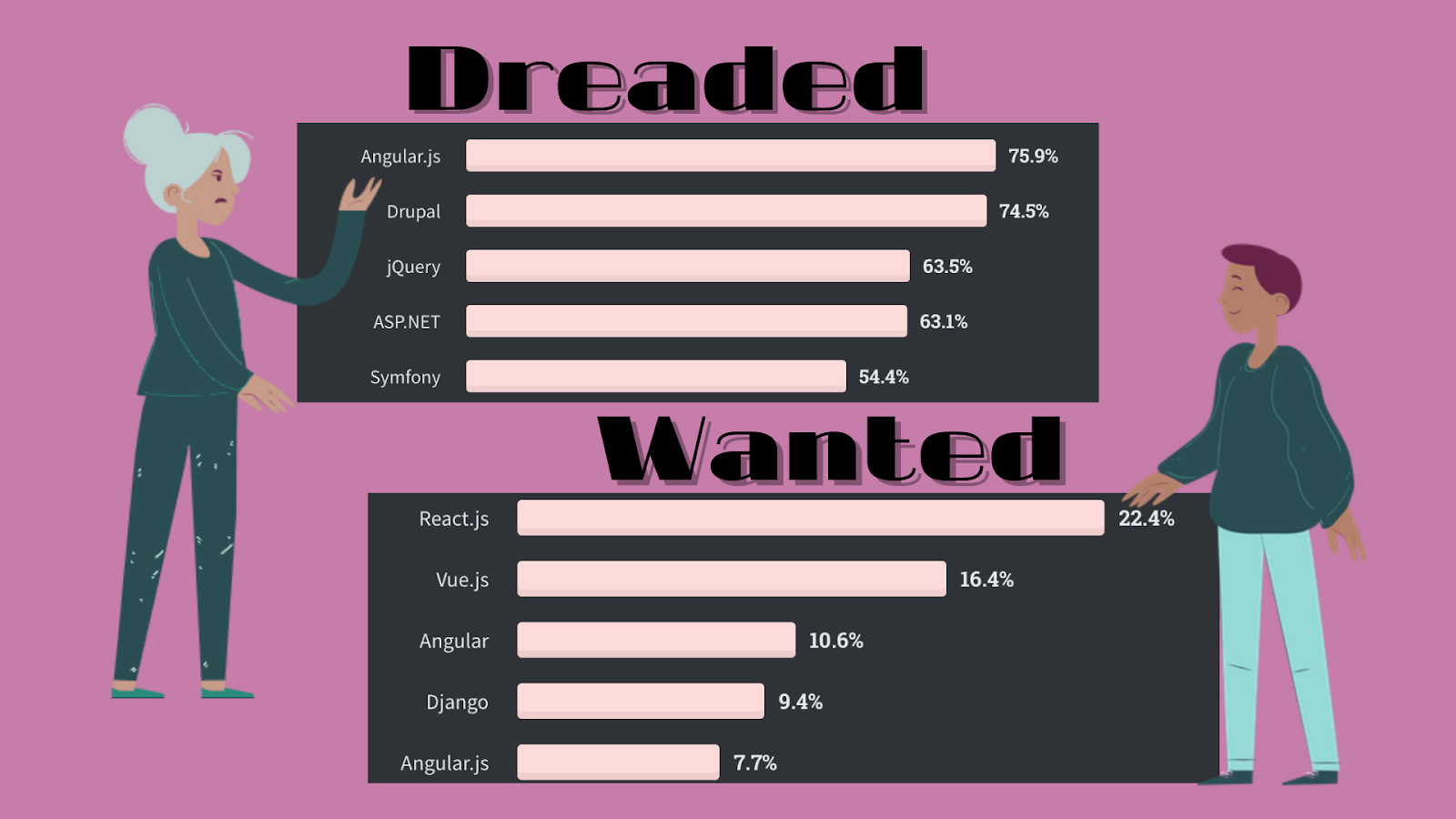
Judging by most dreaded and wanted frameworks, jQuery and Angular have slightly disappointed some users, and Vue.js became one of the most interesting frameworks along with React.
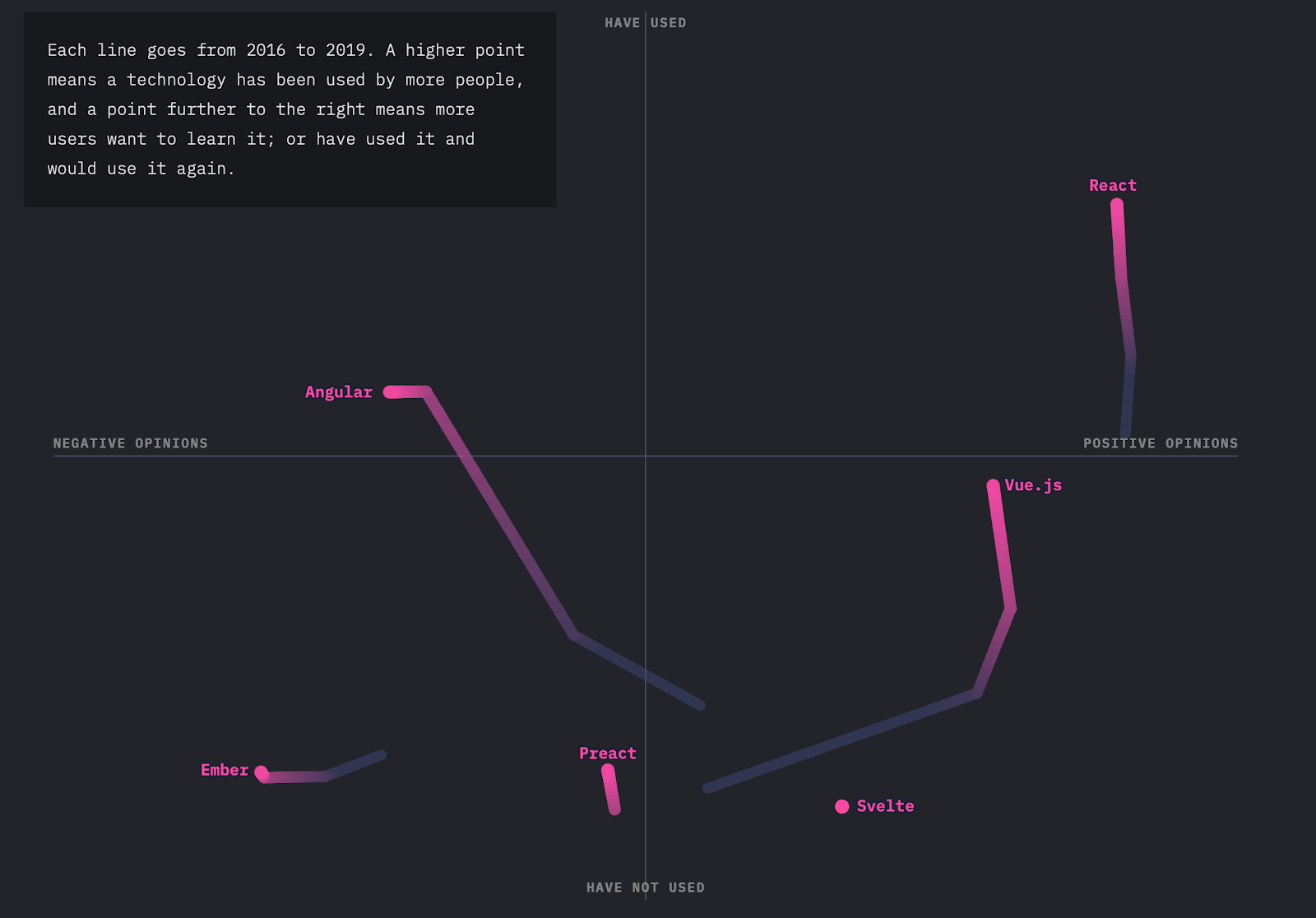
On theState of JavaScript,we can see the development over the years and clearly understand the community’s opinion about each of the frameworks. Altought, we come across several new names that have not been featured previously as Preact, Ember, and Svelte.
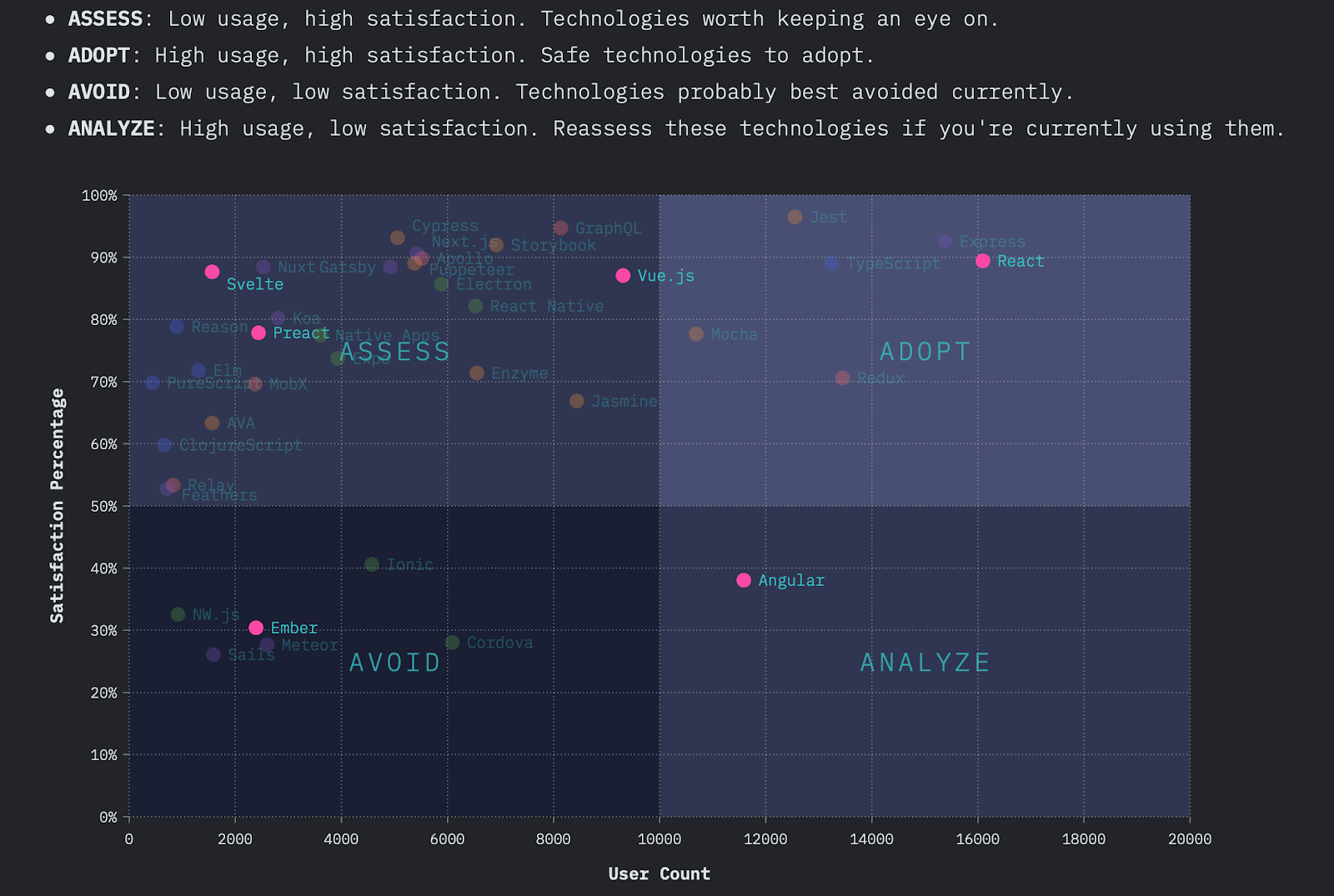
Now I suggest making a small overview of each of the above frameworks and learn a little more about their features.

jQuery is an open-source JavaScript library written by John Resig that simplifies HTML, CSS, and JavaScript interaction. It was released in 2006 and has attracted a lot of developers.
What has made jQuery so popular is its ease of use, big community, and ability to keep the code concise and pretty simple. jQuery is primarily designed to find and manipulate elements on a web page easily.
? This framework is used in developing small desktop-based JavaScript applications. But jQuery can’t compete with the modern frameworks with advanced facilitation of JavaScript, less coding, and reusability of components. It makes large applications heavy by putting a lot of code.

React is one of the most talked-about frameworks in the modern world. It was released in 2014 by Facebook and is very similar to Angular but managed to surpass the last one quickly. React is flexible, can be combined with other frameworks, and has a huge community.
On the other hand, due to multiple updates in the framework, it is difficult to make the optimized documentation, which makes it harder to start with it. However, the large community makes it easy for new learners to get the concepts.
? React is the right solution for single-paged applications and creating reusable UI components. Also, it’s a good idea to use it in large web applications.

Angular was officially launched in 2016 by Google and offered all the necessary features. One of the things that distinguish Angular from React is its two-way data binding, which means the real-time synchronization between the model and the view. It usually does not require additional libraries and such functions as component-based routing, project generation, and so on can be implemented with the means of Angular package. Although it requires much effort to learn and documentation can be too complex or confusing to read. Fortunately, the big community will always be there for you to help.
? Angular is useful in developing web and mobile apps, enterprise-based and both single- and multiple-page applications.

Vue is a simple and straightforward framework that continues to conquer the development industry since it was released in 2014. In fact, it combines the best from leading frameworks and at the same time is much easier to learn. At the same time, the Chinese documentation and not a very big community can become a problem.
? Vue is recommended for flexible design structures and is commonly used in building UI, single-paged apps.

Ember is a fast and well-organized framework developed in 2011 with proper documentation but complex syntax and slow updates. Because of the conventional structure and small community, the learning curve of this framework is hard.
? Ember is great for large-scale projects, complex ecosystems, and client-side apps.

Preact was designed to make a JavaScript framework small in size, yet offering all the same features as React. It is quick, effective, small in size and you can understand after several hours of learning.
? If you want to create a small application that does one function well, then Preact may be exactly what you need.

Svelte is one of the most promising frameworks that was launched in 2018. It is not well-known but, regarding its unique approach, is becoming more and more popular. It is faster than any other framework, simple and easy to learn, and uses the existing javascript libraries. The only problem is a very small community so it’s hard to find solutions for your problems.
? Svelte is good to write framework-independent apps or any web app.
Final words
In conclusion, I want to remind you that you can not single out the best framework. You have to build your decision on the desired result. So before choosing a framework for your project, I advise you to first work out its concept well and highlight the main characteristics, which it must satisfy.
If you liked the article and want to keep abreast of the programming news, follow Top Coding News to always know about new trends and exciting developments.
What else to read?
- Best Mobile App Development Tools for iOS & Android
- Best Charts to Show Discrete Data
- Electron.js: Great Tool to Design Powerful Multi-Platform Desktop Apps
- Main Web Development Trends You Should Be Ready For in 2021

At the baseline, every database is a collection of data and information organized in rows and columns in tables, which is stored in a computer system, i.e., a database service. This information is frequently updated, modified, or deleted as needed. We can compare a typical database to a room or rack at the office, which holds important files. If there is no defined and structured process to store and retrieve these files, we may not know how to handle it by understanding which file is stored at which rack and so on.
Like the above example, a database management system or a DBMS is also a software that stacks the given database system’s data. DBMS offers the users and the programmers a defined set of procedures to write data, store it, update it, and backup or retrieve the same when needed. There are various types of database management practices and services used to store and update data. Here in this article, we aim to explore various DBMS applications when you have to make a choice.
What is the objective of database management software?
A typical database management software’s objective is to keep the data stored in good shape and safe. Any standard database software tools will help reduce data redundancy and help maintain data’s overall efficiency. Many of the database management software out there is open source, and there are also some licensed and commercially sold with many add-on features.
Based on your requirement and usage, one can choose the most appropriate database management software to ensure the desired output. Given below is a filtered list of the most popular DB management software in use.
Oracle RDBMS
Oracle is the No.1 database management system, which is used by many top enterprises across the globe. It is relational DBMS or RDBMS software. The current latest version available in the market is Oracle 12C, in which the ‘C’ represents cloud computing. In every aspect, Oracle 12C brings the latest benefits of cloud computing into your enterprise database management.
Oracle DB can support supports multiple operating systems like Windows, Linux, and UNIX versions. The top features of Oracle DB software are:
- 12C is much more secured than many of its predecessors.
- Being cloud-based, it occupies only lesser space.
- It can support huge databases by reducing the CPU and processing time.
For expert advice in choosing an appropriate database for remote DBA, get in touch with RemoteDBA.com.
IBM DB2
Like Oracle, the IBM database management suite is in the top database management systems’ front line. The latest version of IBM DB2 is the release 11.1. IBM started offering DB management services back in 1983. This database is built on assembly languages like C, CPP, etc.
IBM DB2 supports various versions of Windows, Linux, and UNIX, etc. The matures features of this database are:
- It is easy to install and set up.
- Data is easily and highly accessible.
- Can save a fairly huge amount of data.
- Processing speed and accuracy is much higher.
Altibase
It is an enterprise-grade DBMS, which ensures optimum performance and speed. This database falls under the category of open-source relational DBMS. Altibase now boasts of more than 650 top enterprise clients, many of which are Fortune 500 companies. The providers have deployed more than 6000 mission-critical use cases worldwide, covering a wide range of industries. The major characteristics of Altibase are:
Unlike its competitors discussed above, Altibase is a functional hybrid DBMS.
- It can deliver intensive data processing based on an in-memory DB portion and a vast storage capacity due to the on-disk database section.
- Altibase represents a small subset of the conventional relational DBMSs, which offers scale-out technology for better scalability and sharding.
- Altibase is open-source.
Microsoft SQL Server
Microsoft developed its first database monument system back in 1989 and is consistently developing it. The latest version, which came out in 2016, combines relational DBMS benefits with cloud storage. The programming language used to build MS SQL is Assembly C, C++, Linux, etc.
MS SQL can work on both Windows and Linux operating systems. Some of the top-notch features of MSSQL include:
- It is compatible with Oracle DB also and can provide better management of the workload.
- It lets multiple users simultaneously work on the same database.
- However, Microsoft, as we know, is licensed software and a commercial tool.
SAP Sybase ASE
ASE is the short form of Adaptive Server Enterprise. The latest version of this database software is 15.7. SAP started the same back in the middle of the 1980s. Similar to the other middle-level database management systems, Sybase also has many standards features as:
It is capable of performing millions of simultaneous transactions in a matter of seconds.
- It leverages the benefits of cloud computing.
- Mobile devices can be easily synchronized with Sybase DB.
- Like Microsoft, Sybase ASE is also a commercial tool, comes at a licensing fee.
Teradata
Teradata is one of the first-generation database management software, which was established in 1979. It can work on both Windows and Linux operating systems. Some of the top features of the latest version of Teradata DB software are:
- The import and export of data are much easier.
- Multiple simultaneous processing is easy.
- Data can be distributed easily.
- Teradata is useful in the case of managing huge databases.
ADABAS
ADABAS is the short form of an Adaptable Database System. It can run on Windows, Unix, and Linux operating systems. It is also a commercial tool that offers many customized packages for users to choose based on their requirements. The major features of ADABAS are:
- Much faster data processing, whatever the load is.
- The output of transactions on the database are very reliable.
- The architecture of ADABAS DB is much flexible and keeps pace with the fast-changing industry demands.
- It is a commercial tool for enterprise users.
Some other popular options for you to consider are MySQL, FileMaker, Microsoft Access, Informix, SQLite, Couchbase, Toad, Sequel PRO, Redis, CouchDB, Neo4j, PostgreSQL, Amazon RDS, MongoDB, SQL Developer, OrientDB, Cloudera, MariaDB, etc.
You can make a wise choice by comparing the features of each against your requirement at hand.
Data visualization and database reporting tools
Searching for tools to analyze and visualize data from your database? Check out the list of JavaScript libraries to build dashboards with.
In the previous tutorial, you learned how to filter pivot table data to show relevant information first.
Let’s not stop there!
This time you’ll learn how to make your report look visually perfect. For this, you’ll use the interactive formatting feature of WebDataRocks.
Why formatting is important
An essential part of any report or dashboard is its readability. Your audience should understand its meaning at a glance.
Therefore, as a finishing masterstroke of your data analysis, you can format essential data to make it easy to digest.
In this tutorial, we will consider two main types of pivot table formatting, namely:
- Number formatting
- Conditional formatting
Want to get straight to the practice part?
Jump to the Live demos section.
Otherwise, let’s dive into the motivation behind data formatting first.
What is the number formatting
The number format defines how numerical values are shown on the grid. It is useful in many cases, for example:
- Formatting financial data (e.g., adding and aligning currency symbols, showing values as percentages, etc.).
- Making data look cleaner by controlling the number of digits after the decimal separator.
- Handling regional difference, e.g., writing decimal numbers with comma or period, formatting the thousandths place.
Apart from the cases mentioned above, you can also:
- Align values on the right or left side of the cell
- Control how empty cells or infinity values are displayed
- Define the maximum number of symbols to show in a cell
To examine all the number formatting options, check out our detailed Pivot table number formatting guide.
How to use number formatting in a pivot table
You can set a number format for particular measures of the pivot table widget in any of the following ways:
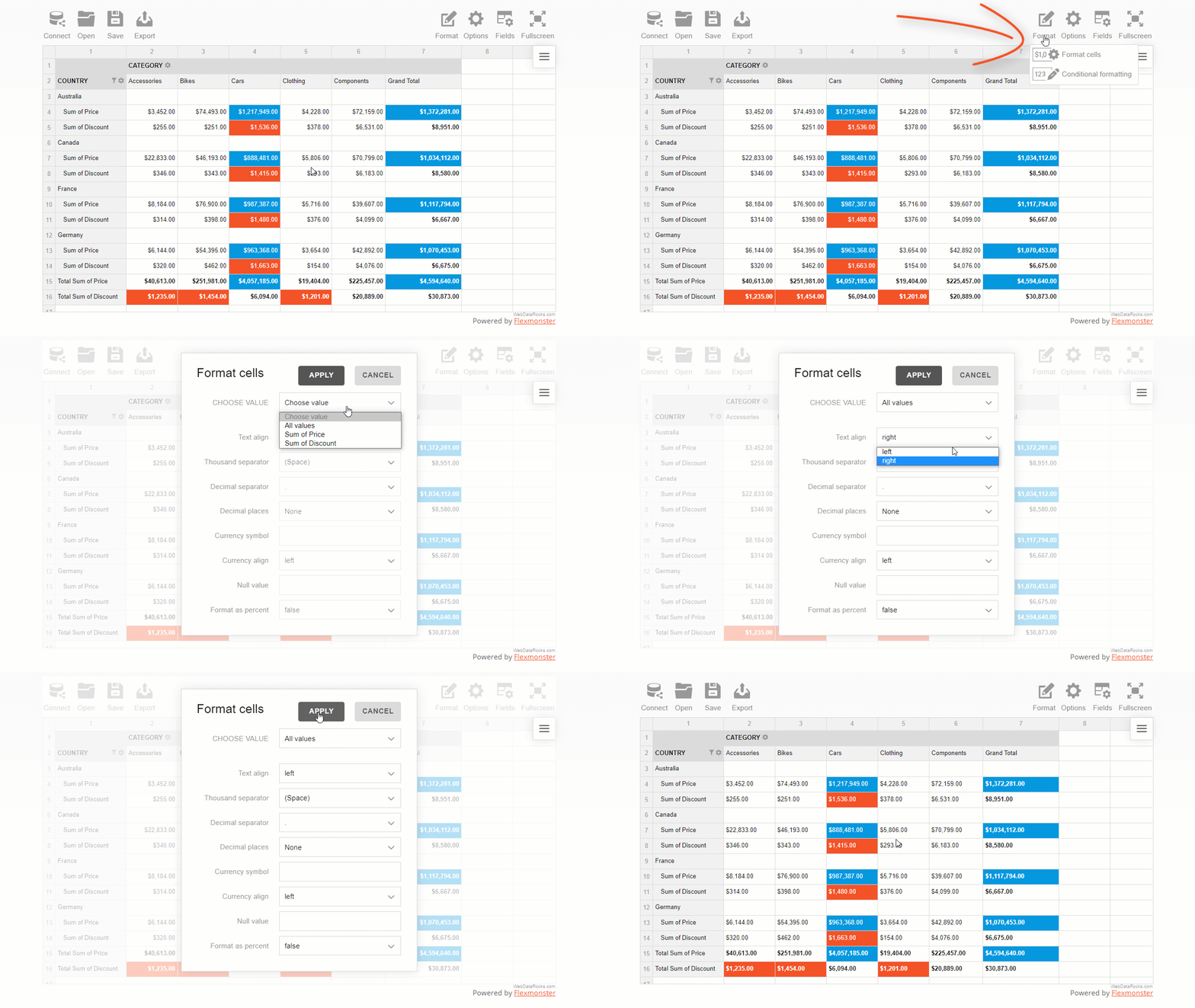
- Via the UI
Here is how end-users can format their data via the intuitive and comfy pop-ups:
- In code
The programmatical approach gives you more freedom to implement custom logic of formatting.
Let’s see the samples and gain some practical coding skills.
- Format values of “Price” with a dollar symbol.
- Format values as percentages.
- Change the number of decimal places displayed in a pivot table.
What is conditional formatting
Conditional formatting is a particular formatting type by cells’ values.
The name itself suggests that formatting is based on conditions, i.e., user-defined rules that describe how values have to be formatted. This rule is a logical statement, also known as a boolean expression). The rules are always applied to the pivot table measures.
With conditional formatting, you can change the color of the cell’s background and text and manage the report’s typography: font color, family, and size.
This feature helps you highlight information that is crucial to see first. It also allows you to make trends in data more noticeable.
How to use conditional formatting in a pivot table
- The most convenient way to apply conditional formatting is via the user interface.
A comfy color picker lets you choose the color that suits your reporting goals best:
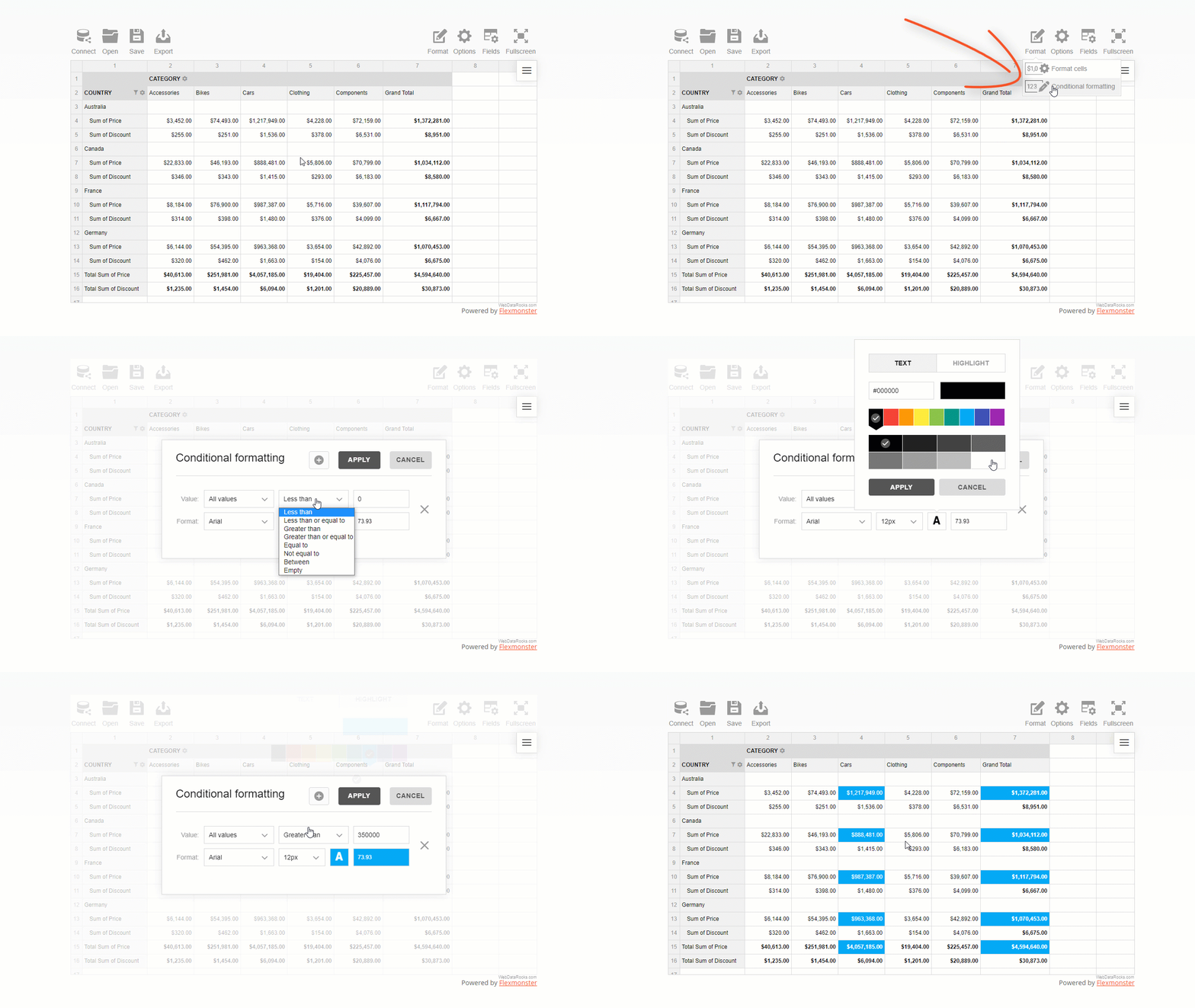
You can also set a custom hex color value for text or background.
- In code, it is as simple as defining a tiny JavaScript object in your report’s structure.
For example, here is how you can color pivot grid cells green based on the values of the “Revenue” measure:
"conditions": [
        {
            "formula": "#value > 600",
            "measure": "Revenue",
            "format": {
                "backgroundColor": "#8BC34A",
                "color": "#FFFFFF",
                "fontFamily": "Arial",
                "fontSize": "12px"
            }
        }
    ]
Live demos
- Format values of “Price” with a dollar symbol
- Format values as percentages
- Change the number of decimal places displayed in a pivot table
- Apply conditional formatting to the pivot grid
- Apply conditional formatting to the data grid
Wrapping it all up
Now you made sure how flexible WebDataRocks Pivot is when it comes to prettifying your data. Not only can you analyze your data fast but also prettify your report neatly and make it speak.
Useful reading
Documentation
More reporting tips & tricks
To improve your reporting skills, learn how to filter pivot table data, and set a data slice.
Ready to share results? Not sure how to do it best? We’ve got you covered here as well!
Move on to a detailed tutorial on how to save and export a pivot grid report.
Learn about the pivot table essentials with the detailed UI guide.
Advanced pivot table formatting
If, by any chance, there is an option that you haven’t found in WebDataRocks, we recommend testing Flexmonster Pivot Table & Charts – an even more powerful pivot table component. It offers extra number formatting options: negative numbers formatting, centered alignment of values, and more.

Data Visualization and Its Rising Influence
Today, every business, regardless of its size, deals with massive amounts of data. In fact, one can safely say that data is essential to the survival and progress of organizations. An Experian report says that over 90% of business executives believe that data plays a key role in forming business strategies.
However, data is only beneficial if you can make sense of and derive crucial insights out of it. Business executives have been trying to find ways to transform data and statistics into valuable intel that can be used to make decisions.
In recent years, tools like Power BI and Tableau have emerged as business solutions that allow users to convert data into neat visualizations. Modern data visualization tools are well-suited in dealing with huge chunks of data, organizing them, and transforming them into something meaningful.
Simply put, data visualization is the procedure of converting data into meaningful visual forms. But why are businesses so keen to do it? In this article, we will discuss how data visualization services can transform the way you do business.
Simplifies Complex Sets Of Data
One of the primary strengths of machine learning is the ability to process unstructured, raw data. However, plain text sometimes makes it difficult to portray or understand the results derived from data processing.
For instance, you have a tool that assesses social media traffic to determine your brand’s public perception. Now, the findings of that tool can either be in the form of a 150-page report or just a few well-designed visuals.
Helps Convey The Message
If you want a room full of customers, buyers, or potential investors to know that your business is growing, you will want the message to go across smoothly and clearly. The best way to do it would be to present the data in the form of visually-pleasing, simple bar charts, or line graphs. On the flip side, no investor or customer has the time to flip through hundreds of pages of dry numbers and text to see whether it is worth investing in your business or not. The key is to show the message, which is only possible through data visualization.
Finds New Links Between Datasets
Data visualization is not restricted to trend charts and graphs, which have been around for decades. In fact, the ability to visualize and operate data sets helps businesses find new connections that they were previously unaware of.
You can identify which business conditions can influence other conditions, and which ones are unrelated. Many of these connections are only noticed upon ‘seeing’ your data.
Shows Trends
Say, you are using a regular Excel table with a column each for revenue, expenses, and the sources of those numbers. Such a way of representing data will make it hard for you to derive insights.
On the other hand, depicting the same data through trend lines and charts will enable you to spot, for instance, your most and least profitable months, quarters, and years.
Optimizes Decision-Making
One thing that every business owner will agree upon is that the business world is one of relentless competition. In industries fueled by competition, time is perhaps the single-most-important factor determining business growth.
Let’s say that you and your competitors have a close eye on the industry trends. The business that will dominate the next quarter is the one which can make the correct decision, quickest. Agree?
Data visualization enables you to make better sense of data, such as future predictions and fast trends, in a timely manner. The resulting quicker and more informed decision-making will help your business gain the upper hand over its rivals.
Suggests Future Actions
With data visualization, you can contextualize apparently dissimilar bits of information. Looking at the bigger picture allows executives to identify vulnerable areas and act accordingly before those vulnerabilities start materializing.
At the same time, effective visualization will also pinpoint hidden growth opportunities that you can capitalize upon.
Helps With Long-Term Data Retention
It is no secret that a picture is easier to remember than text. It is believed that people remember around 10 to 12 % of what they hear, but over 30% of something they see.
This means that no matter how well-explained your written report is, it will always make a lesser impact on people’s memories than a well-illustrated piece of data.
Encourages Personnel To Use Data
Organizational resistance is perhaps the biggest hurdle to implementing data analysis in business decision-making. Even though executives understand the importance of data science, they find it too inconvenient to utilize it regularly.
Data visualization can go a long way towards eliminating this hurdle by presenting data in interactive and perceptible formats (instead of in plain text).
Promotes Fact-Based Decision-Making
It is observed that data-centric organizations generally fare better than organizations that trust their gut instincts for the bulk of their decisions. By prioritizing data visualization and its resulting insights, you can improve your company’s overall performance considerably. This is not to say that intuition does not play a role in decision-making, but that role might not be as substantial as many organizations believe.
Data visualization is here to stay
In his book, 21 Lessons for the 21st Century, Yuval Noah Harari dedicates an entire chapter to the importance of data and why ‘people who own data, own the future.’ In the Fourth Industrial Revolution, the most significant players competed not for oil or gold but for information.
Therefore, businesses must know how to collect, observe, and visualize data adequately. If not, no matter how good your organization might be today, it will not be able to move with the times, and, before you know it, it will cease to exist.
About Narwal
Narwal is a US data visualization company that helps transform businesses by visualizing their data more efficiently. You can contact them today to get a free-of-cost consulting session.

The financial industry is famous for being traditional in many aspects, but they are slowly introducing new technologies to their processes. These trends utilize financial technology (fintech) and affect customer service, risk management, and real-time assessments for years to come. The best part about fintech is the use of artificial intelligence (AI) and blockchain, which are still in their early stages. The potential for their use is promising.
Blockchain
Blockchain is a tech trend that has impacted the financial industry the most in recent years.
Blockchain is the technology behind cryptocurrency, but it has many more applications besides that. It has become so popular because it makes transactions secure, transparent, and decentralized. But because transactions are decentralized, they no longer need a third party like a bank to participate in the transaction. Regardless, the banking sector can adopt this tech trend to make their systems more efficient and secure. For example, things like smart contracts that can fulfill themselves automatically when certain conditions are met will change the way we exchange money. Blockchain can also reduce the costs of operation for many financial companies.
Artificial Intelligence
One of the primary applications of AI and Machine Learning in the financial industry is the improvement of customer service through the use of chatbots. They automatically respond to simple queries any customer can have. Some robots can act as financial advisors in some cases. Similar trends in automation can be seen in all sectors. Robots are helping assembly lines create products for customers. This tech trend of using AI is also used to improve the security system in financial institutions. AI is used to predict attacks and prevent fraud. AI algorithms are already used to train models that can detect suspicious activities in bank accounts, make risk management analysis, user behavior, and so on. It is also behind big data analytics, voice interfaces, and robotic process automation.
Big Data
Big data has changed how industries see and manage information. In the financial sector, data is used in everyday transactions, credit card buys, atm withdrawals, loans, and much more. With big data analytics, transaction information isn’t going to waste anymore. Financial institutions can have powerful insights through the use of data that help them make important decisions like whether or not to invest. These insights can save millions of dollars to many companies through the use of real-time risk analysis and fraud detection and prevention. It can also help improve their company performance and increase departments’ productivity.
Voice Interfaces
Voice interfaces are changing a lot of aspects of our daily lives. Voice assistants, like Amazon’s Alexa and Apple’s Siri, are advanced technology that we see as standard nowadays. These are changes that are also being utilized to improve the financial industry. Companies and institutions like banks are reworking their platforms to adopt voice recognition software. Checking your bank account can be as simple as to say, “Alexa, what’s my bank account balance?” Chatbots are part of this tech trend. They can interact with these virtual assistants to give accurate answers in seconds. And, banks aren’t the only ones implementing this tech as chatbots can also provide quick financial advice like mentioned before.
In conclusion
These tech trends have already made changes in the financial industry. Blockchain, AI, voice interfaces, and big data make it possible to improve aspects like performance and lower costs. The application of these technologies will save the financial industry millions of dollars, and investing in them could determine their future standing.
Further reading
- The best data visualization libraries for building interactive dashboards
- How to build a business intelligence dashboard with JavaScript libraries
Last time, you learned how to arrange fields on the grid and filter data records in a table.
In this tutorial, you will learn how to save your pivot table reports fast and conveniently.
We continue exploring the functionality of WebDataRocks Pivot – a reporting tool that integrates seamlessly with the most popular front-end frameworks. You can add it to your product and provide end-users with data visualization and analytics capabilities.
In the previous part of the “Reporting tips & tricks” series, you learned about the purposes of the pivot table’s data slice.
This time, you will learn how to make your reporting more advanced by creating filters in the pivot table.
In WebDataRocks Pivot, you can filter your data interactively or with a simple code configuration.
If you’d like to learn by doing without reading the explanations, jump straight to the section with live demos that show how to filter pivot table data in different ways.
The tutorial is divided into two main parts:
But first, let’s have a quick theoretical introduction.
What is filtering?
With filtering, you can perform a more in-depth analysis. To filter the data means to show a part of the data that meets a certain criterion. In other words, filtering is used to show specific information that’s relevant to a question a data analyst is asking.
Once the data is filtered, it’s narrowed to a smaller portion and doesn’t distract with unnecessary details.
Types of filters
WebDataRocks Pivot provides three main types of filters to end-users.
You can filter data by:
- field members (label filter)
- values (number filter)
These two types filter data in specific rows or columns. Another filter type that stands aside is a report filter. It filters the entire report to show specific data records. In WebDataRocks Pivot, you can place a report filter above the grid’s header by dragging and dropping a field from the Field List.
How to filter data in the pivot table
1. Filtering data via the visual controls
The pivot table is designed to let you filter data on the fly.
Let us guide you through the filtering via the UI process.
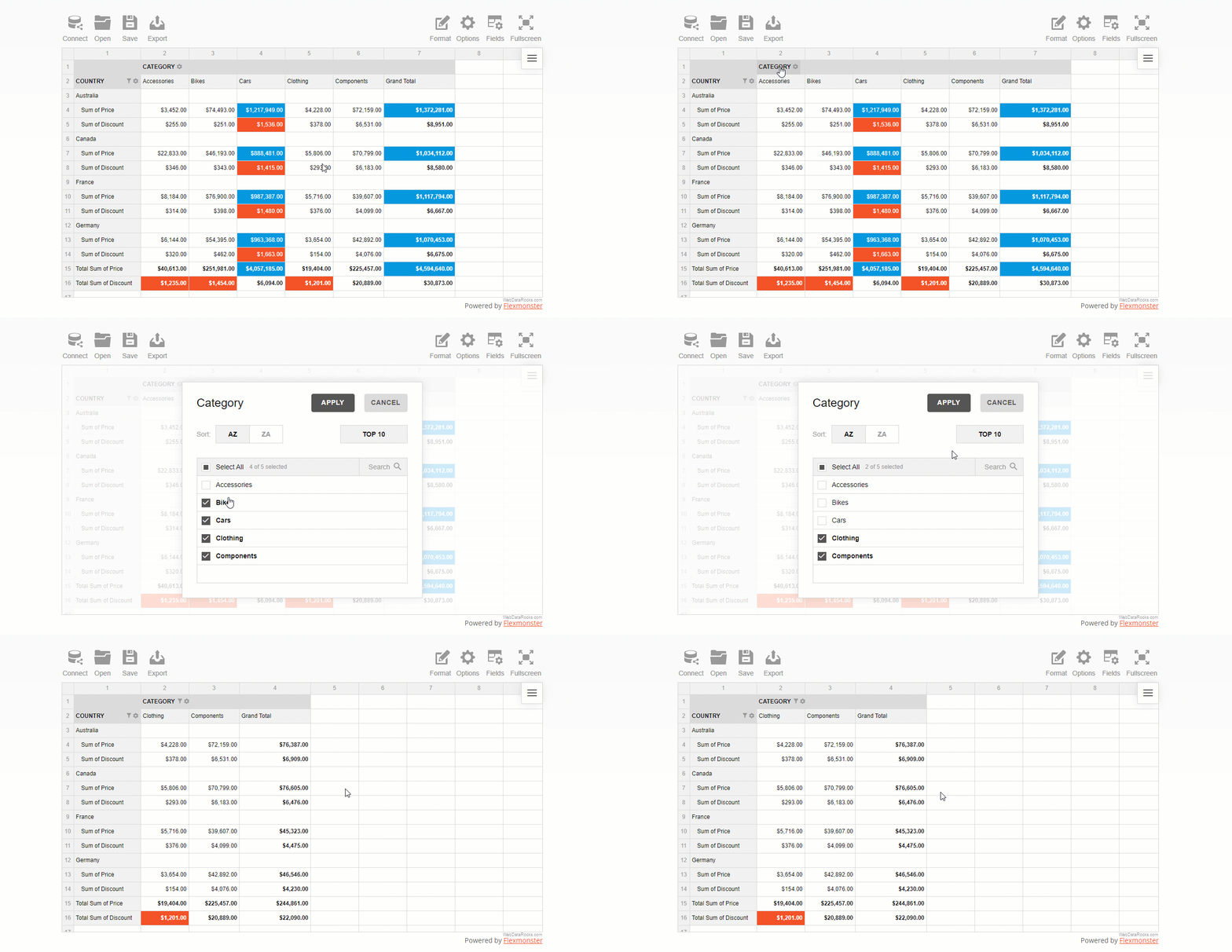
How to filter data by members
After you configured the report, open the field values (members) list by clicking the field’s caption.
Check or uncheck the boxes near the field’s members that you want to include or exclude from the resulting data subset.
If the list of members is too large, using the search box comes in handy.
How to filter data by value
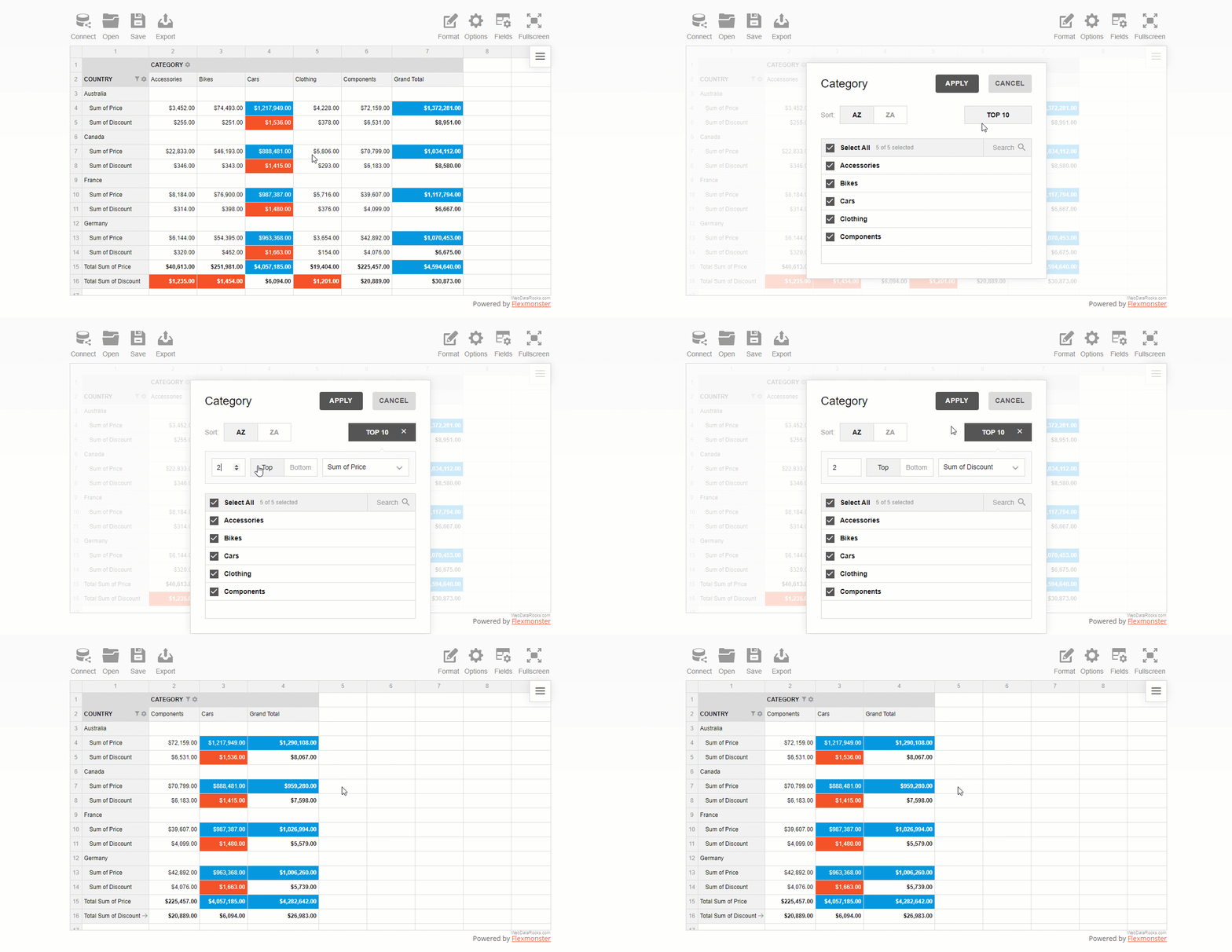
A value (number) filter filters records in a row or column field based on aggregated values.
There are two types of number filters you can use:
- Top X values
- Bottom X values
where X is the number of records to show on the grid.
This is pretty much similar to Excel’s filters by values you got used to.
To use a filter by value, click the field’s caption on the grid, select the number of data records, and the criteria – the highest or lowest measure’s values to display.
How to set a report filter
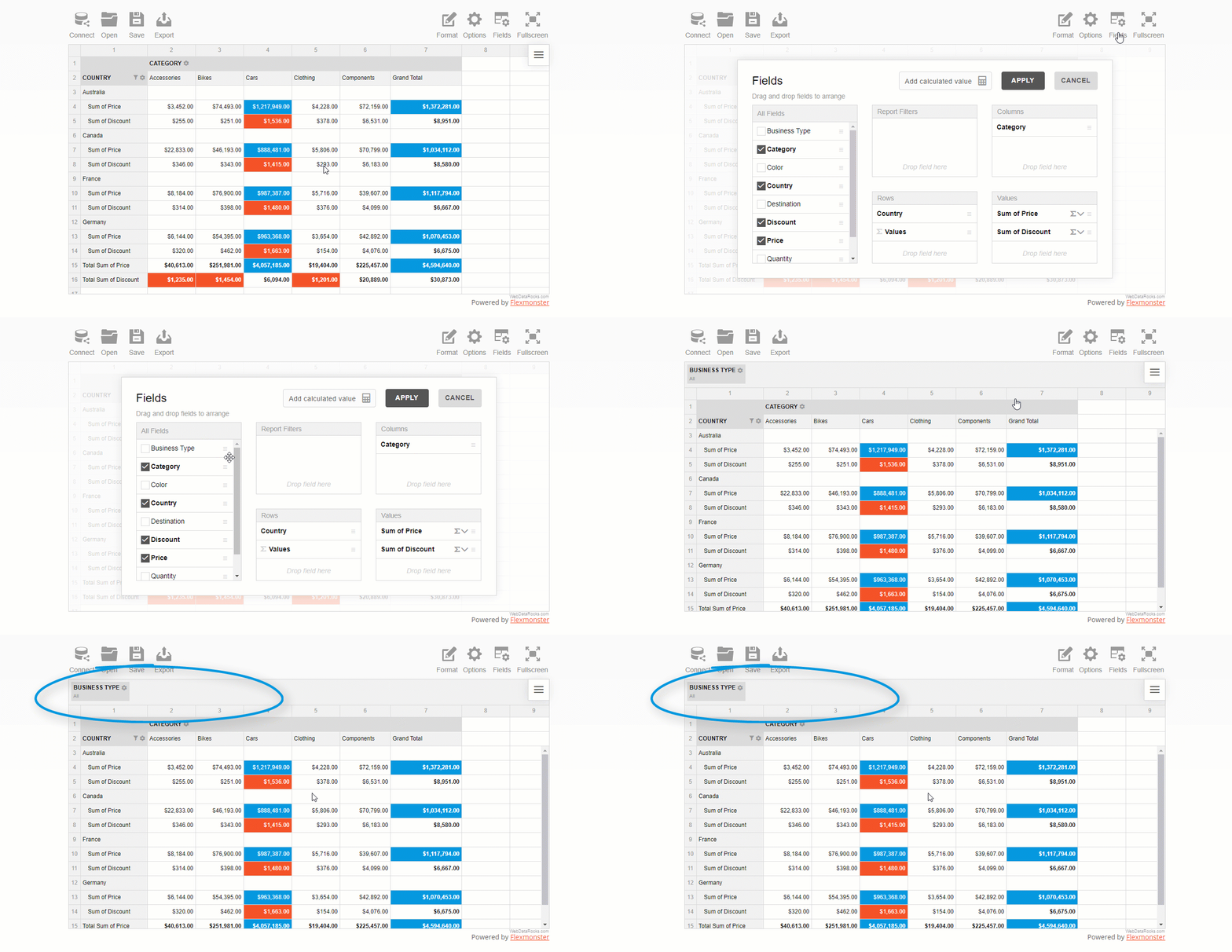
A report filter is applied to the entire report to show values for specific items.
First, open the Field List and choose the field to filter by. Next, open the list of members by clicking the field’s caption and filter data by members or values.
The area above the grid’s header is called the report filtering area:
How to apply multiple filters in the pivot table
You can also apply multiple filters to the hierarchy. For example, here’s how you can combine a filter by value and by member:
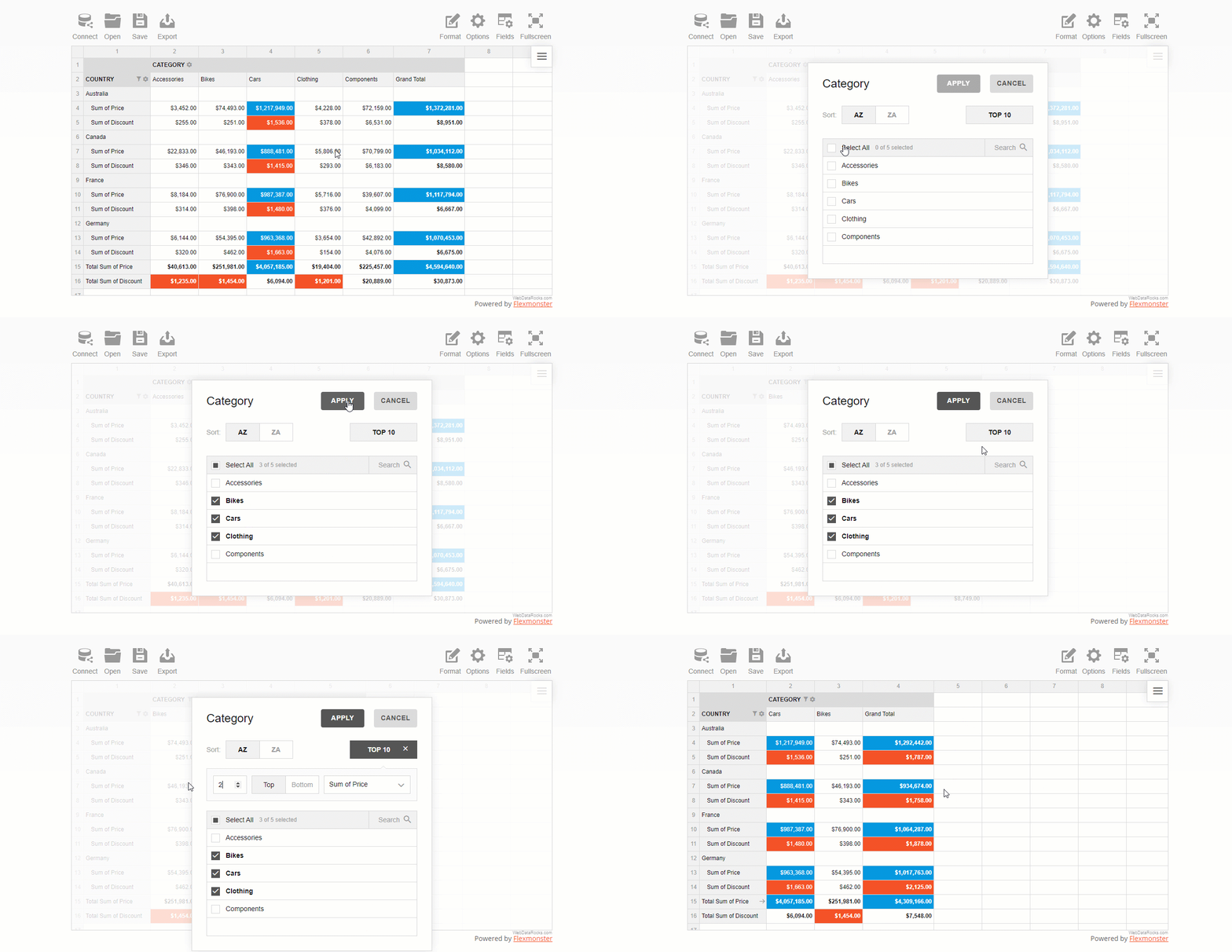
As you see, configuring filtering in a report is as easy as several clicks.
Now let’s get some coding practice and do the same but using JavaScript.
2. Filtering data with code
How to filter data by members
In the chosen hierarchy, add the filter object and specify an array of members. The negation property controls whether to include these members to the subset of fields shown on the grid or not.
Here’s a tiny code snippet that shows how to exclude two specific members from the Country hierarchy that is placed into rows:
"rows": [{
    "uniqueName": "Country",
    "filter": {
        "members": [
            "Country.United Kingdom",
            "Country.United States"
        ],
        "negation": true
    }
}]
How to filter data by value
In the filter’s object of a specific hierarchy, define the filter type, the number of records to show, and a measure to filter by:
"columns": [{
    "uniqueName": "Category",
    "filter": {
        "type": "top",
        "quantity": 2,
        "measure": "Discount"
    }
}]
How to set a report filter
Setting a report filter is similar to the above approach. The only difference is that doesn’t relate to any specific row or columns – the changes are applied to the entire grid. You can choose here any hierarchy you want to filter the data by.
Here’s how you can filter data records by a specific business type:
"reportFilters": [{
    "uniqueName": "Business Type",
    "filter": {
        "members": [
            "Business Type.Warehouse"
        ]
    }
}]
Examples & demos
The best way to learn is by practice.
These demos will help you to understand how to add filters to the pivot table component. Feel free to experiment with code.
- How to filter pivot table data by values: top 3 product categories by sales level
- How to filter pivot table data by labels: shows sales levels for 2 specific countries
- How to use a report filter in a pivot table: filter all the records by a business type
Feedback
We hope you enjoyed this tutorial.
We would be happy to hear your thoughts on your progress with pivot table reporting. If any questions arise, contact our team on Forum.
To keep updated with new blog posts, you are welcome to follow WebDataRocks on Twitter.
What’s next?
This article is a part of the introduction to the web pivot table terminology. We do our best to show how to solve real-life use cases with our reporting tool.
Find more useful tips & tricks in the following blog posts and documentation:
- Everything You Need to Know About a Pivot Table
- How to filter data in a pivot table
- Reporting tips & tricks: slice explained

What is R Shiny?
R Shiny is a package for building interactive web apps with R.
The distinguishing feature of R Shiny is that you can build analytical apps with minimum lines of code and simple syntax, and put them on the web in a short time.
Pivot for R Shiny
Great news for the data science and analytics community!
Now you can use our pivot table component in R Shiny projects.
We are extremely grateful to our active community for contributions. Thankfully to Mohamed El Fodil Ihaddaden, now our users can perform data analysis with WebDataRocks in R Shiny apps.
R Shiny comes with a great collection of interactive widgets. We believe WebDataRocks perfectly complements it. With the pivot table and simple syntax of R, you can build a dashboard that assists in connecting data scientists with decision-makers.
Features & benefits of Pivot for R
The role of WebDataRocks lies in aggregating and presenting your data in a neat tabular report. By handling all the data-related calculations, it acts as an engine for your dashboard. So, once it’s added to the dashboard, end-users can:
- Drag and drop fields on the grid
- Slice and dice data to compose a unique report
- Sort and filter data records
- Highlight values with conditional formatting
- Format numbers on the grid
- Export reports into a suitable format
And more! To dive into the world of WebDataRocks features, peek into our UI guide.
Creating a simple analytical app with R Shiny
Let’s apply our knowledge in practice and create a single-file R Shiny app with basic reporting functionality.
Create a new directory (e.g., reporting_app) and the app.R file that contains a user-interface definition and a server script. Run the R Studio and make this folder your working directory.
Next, install the pivtalibrary – a wrapper for R:
remotes::install_github("feddelegrand7/pivta")
Then, load the package to the app:
library(pivta)
Next, render the pivot table using pivta() function and passing the path to a data source and the report configuration as inputs.
pivta(dsource = "https://cdn.webdatarocks.com/data/data.csv", report = "https://cdn.webdatarocks.com/reports/report.json")
Here is how the full code of the app looks like:
library(shiny)
library(pivta)

ui <- fluidPage(

  # App title ----
  titlePanel("Reporting app"),
  pivtaOutput(outputId = "pivot_table")
)

server <- function(input, output) {

  output$pivot_table <- renderPivta({
    pivta(dsource = "https://cdn.webdatarocks.com/data/data.csv", report = "https://cdn.webdatarocks.com/reports/report.json")
  })
}

shinyApp(ui = ui, server = server)
Despite being simple, it creates an app with powerful pivoting features.
Results
Now you have an interactive dashboard in your R Shiny app. You can extend the app's look and feel by tailoring the UI, add more interactive elements and graphs to your dashboard, or even implement more complex server-side logic.
Be open to experiments. Make your analysis more interactive, comprehensive, and powerful with WebDataRocks for R.

Code
Find the R wrapper for WebDataRocks Pivot Table on GitHub.

If you’ve been following our release updates, then you definitely know we released integration with amCharts.
We feel this new shiny feature needs to be covered in more detail.
If you feel this way, too, make yourself comfortable and let’s figure out what this integration can bring to your reporting and data visualization processes.
If you’re new to the pivot table as an instrument for reporting, this article is a great place to get to know its core capabilities and astructure of a pivot table report. After reading, you can get straight to designing new reports with more confidence and professionalism.
(more…)